Truffle – Music Tag Editor
Press kit
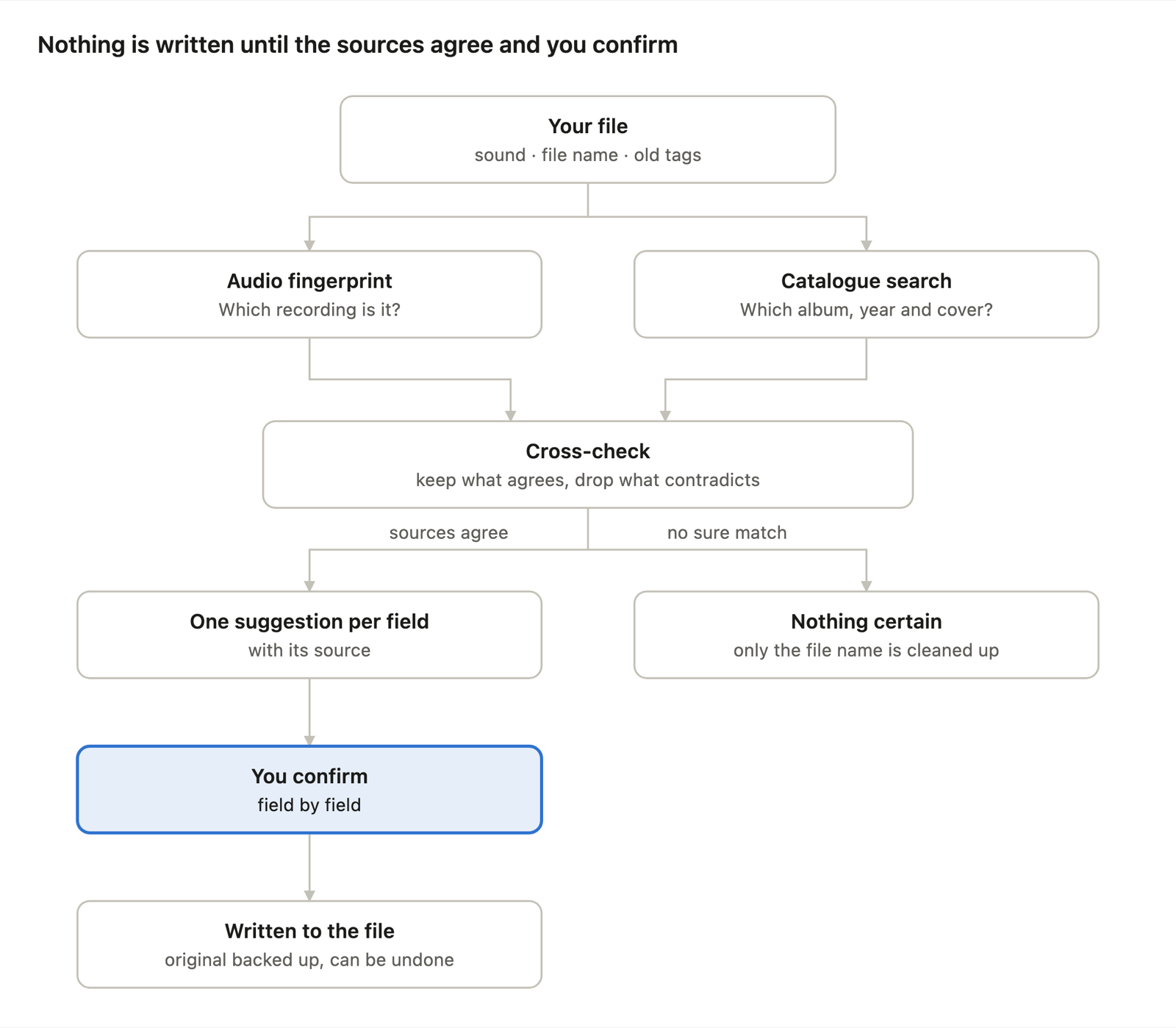
Truffle repairs the metadata of a music library the user already owns: title, artist, album, album artist, genre, year, track number, cover, tempo and key. It identifies each track by its sound and through catalogues, proposes corrections field by field with their source, and writes only what the user confirms.
Screenshots
Previews 1600 px wide. The ZIP contains every image in 2880 × 1800 px.
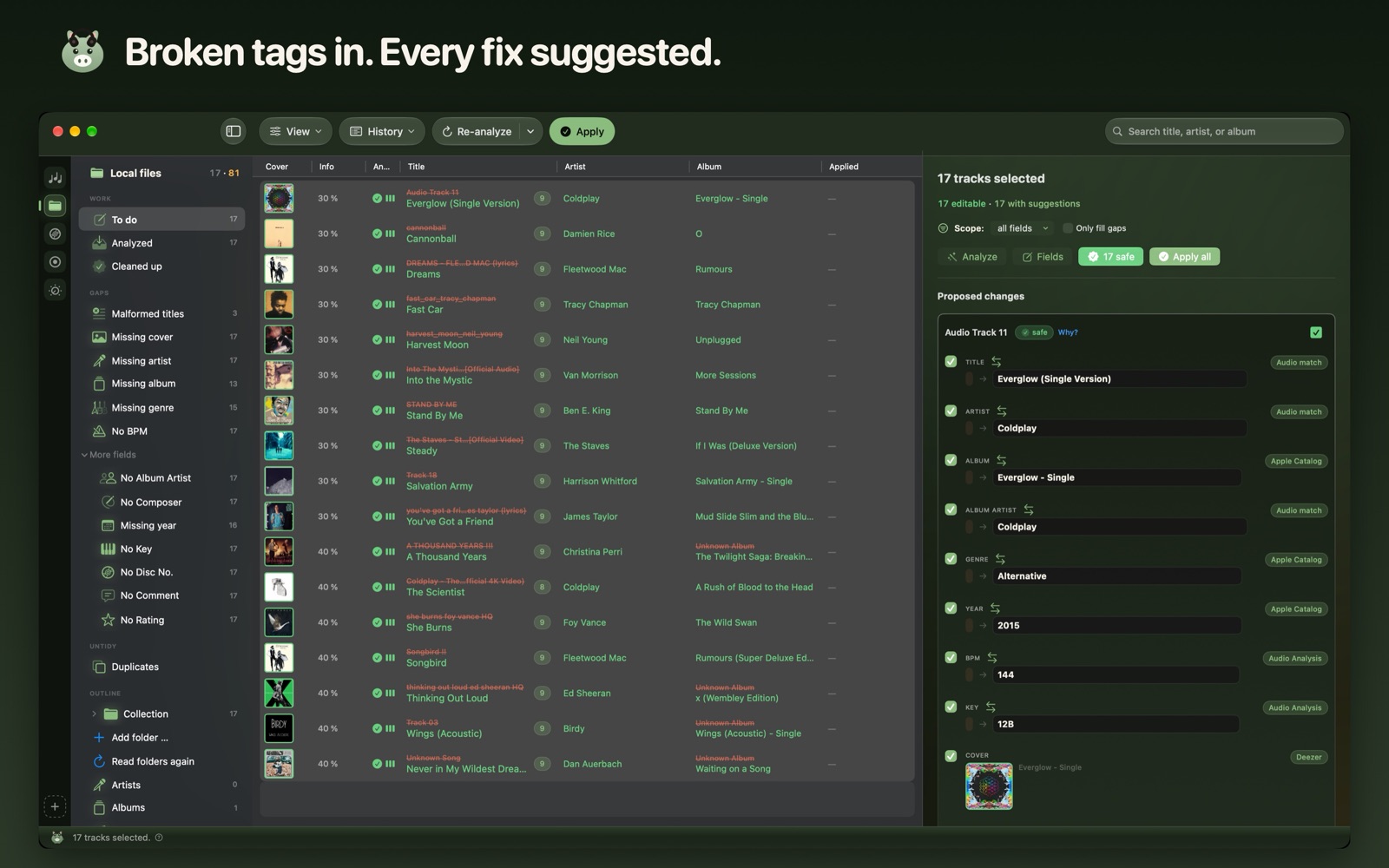
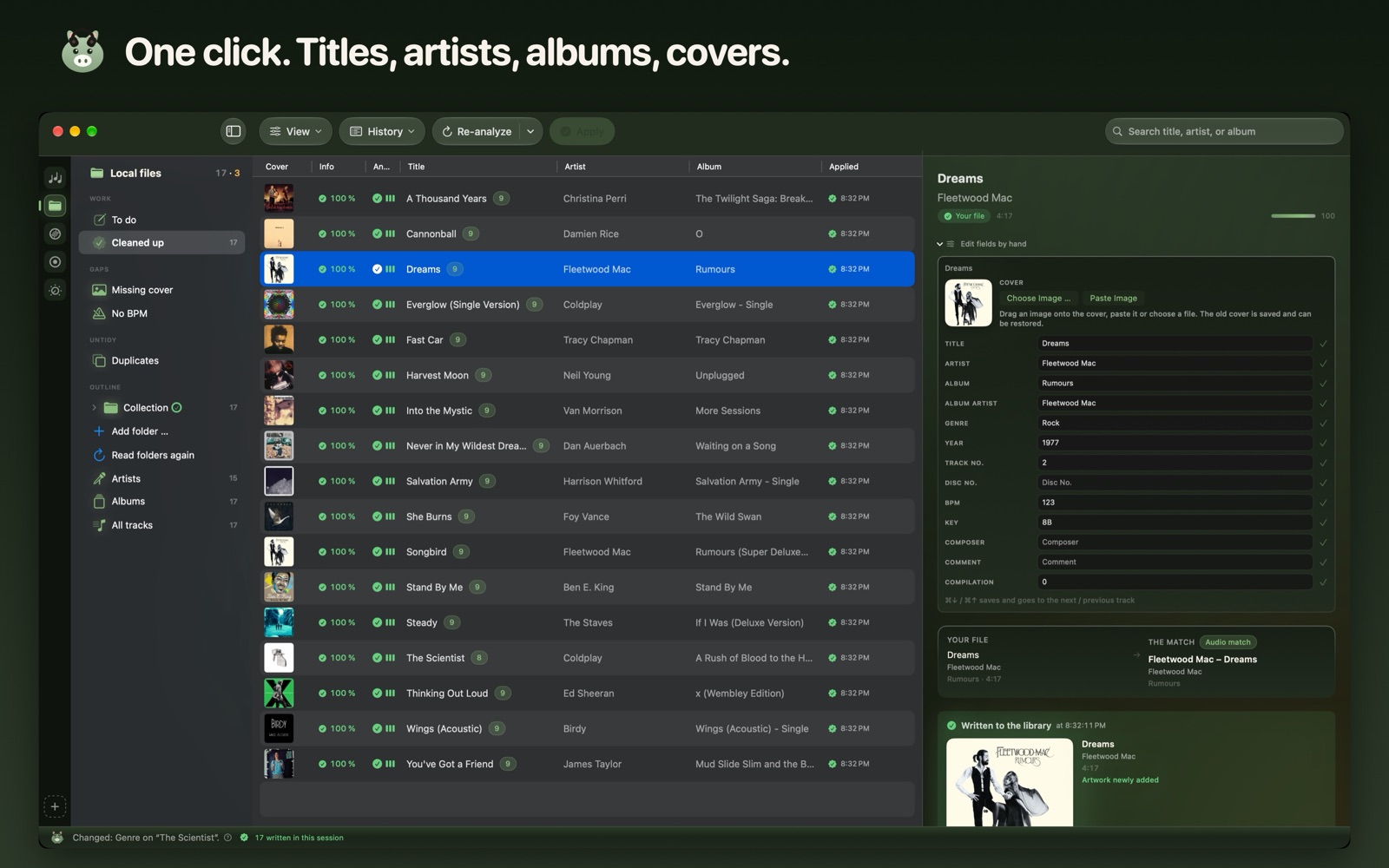
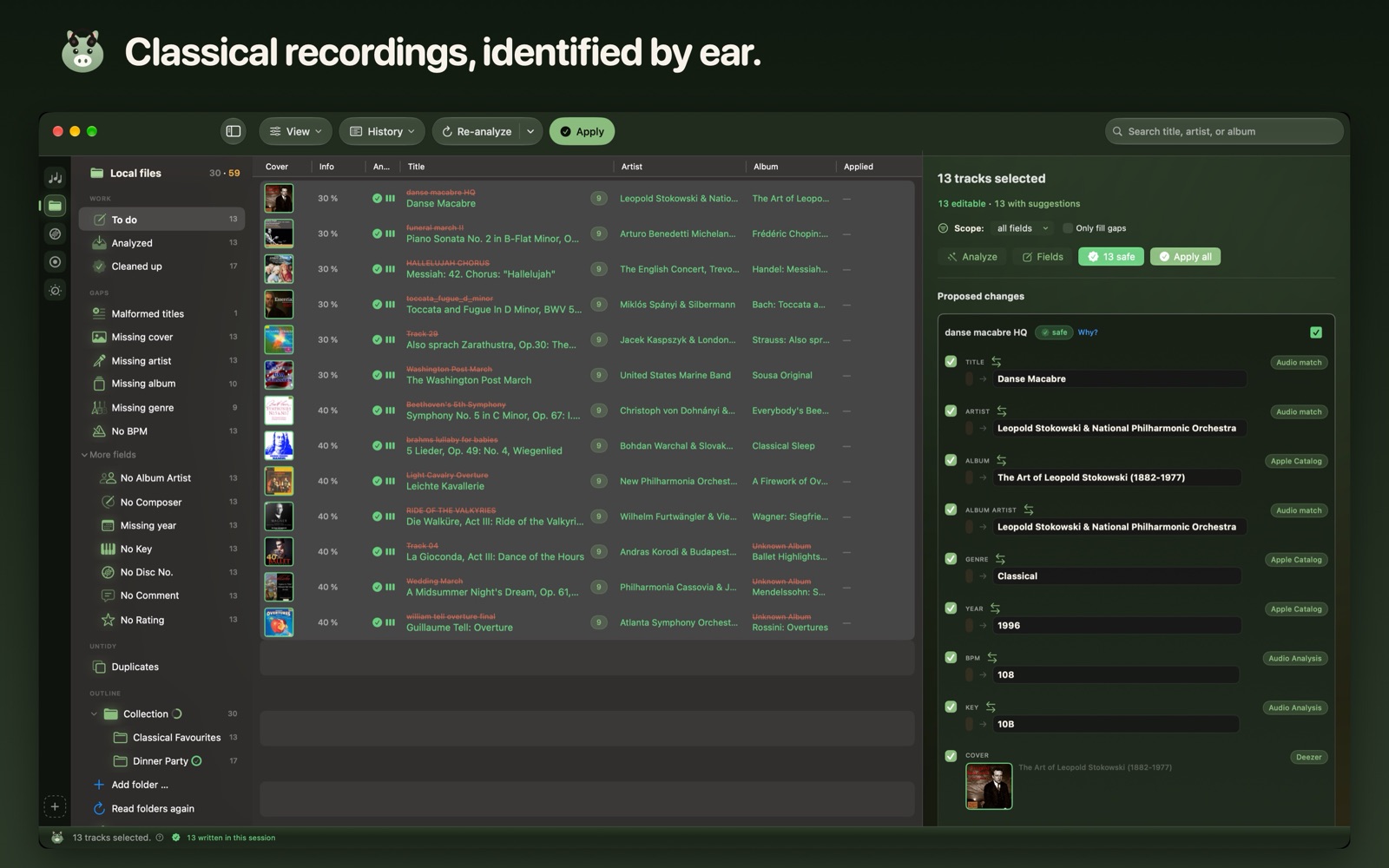
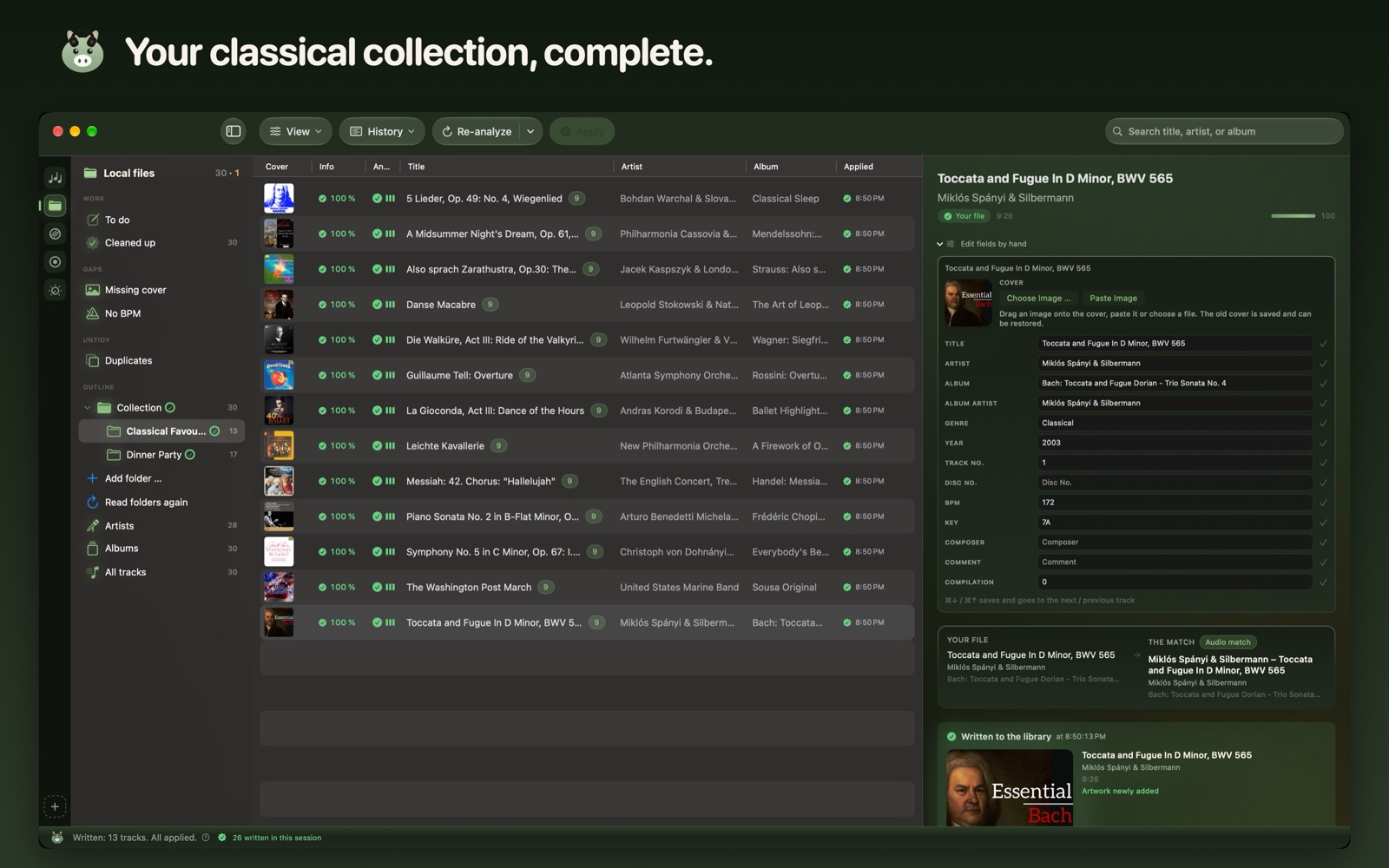
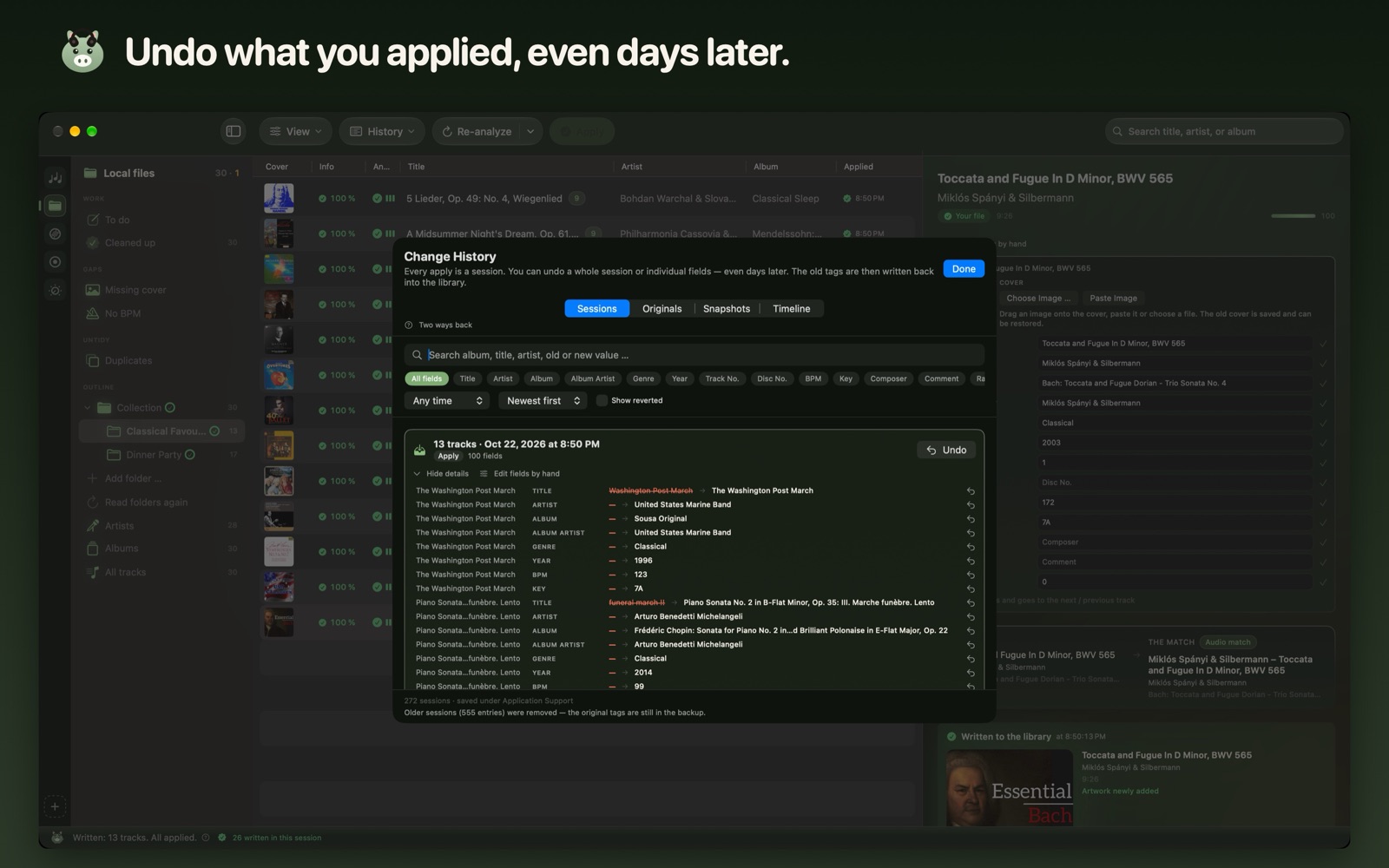
Album artwork visible in the screenshots belongs to its respective rights holders and appears only as part of the app’s interface; please do not cut it out or use it on its own.
The track counts visible in the screenshots come from the developer’s own example library; they are not measurements or averages.
Diagram
Press release
Press release
Vienna, 24 October 2026
Truffle brings order to the tags of large music libraries on the Mac
The Mac app recognises tracks by their sound and through music catalogues and repairs titles, artists, covers, tempo and key: for any collection that has grown over the years, from the old iTunes library of the CD era to the DJ library.
Music libraries that have grown over many years are full of wrong and missing tags: tracks without a name or artist, missing covers, broken umlauts, the same song three times. Fixing that by hand works for fifty tracks, not for thirty thousand. Truffle – Music Tag Editor, available in the Mac App Store since 29 September 2026, identifies each track and proposes corrections field by field, each with its source.
Truffle asks eight sources: Apple/iTunes Search, MusicBrainz, Cover Art Archive, Deezer, Beatport, a web lookup, Apple’s audio recognition and its own audio analysis, which measures tempo and key on the Mac without an internet connection. It compares their evidence, discards what contradicts, and assembles one suggestion. Nothing is written until the user confirms it.
The app works with five libraries: the Apple Music/iTunes library, where it writes back to Music.app field by field; local folders with 17 file extensions, from mp3 via flac to aiff; and the collections of rekordbox, Serato and Traktor. For the DJ programs, repairs go into the audio files. Truffle never writes into a DJ program’s database, so cues, beatgrids and crates stay untouched, and tempo and key are only written on an explicit click.
Beyond tags, Truffle finds duplicates and shows side by side which copy stays and which goes; the file on the Mac always stays, and nothing is deleted without asking. It aligns albums by filling in missing album artists and years, unifying spellings, marking compilations and copying missing covers, with every change listed before it is written. Bulk edit sets one field across many tracks with a preview of every line. Every change is logged in History, the original is backed up first, and anything applied can be undone, one change at a time or as a whole session, even days later. Only deleting cannot be undone by Truffle.
“I built Truffle for my own collection first. It had grown over many years, and finding the right track mid-set had turned into guesswork. Now every suggestion shows me where it comes from, nothing gets written without my okay, and my cues stay exactly where they were!” says Marian Moritz Hildebrand, DJ and developer of Truffle.
For classical collections
Truffle also recognises classical recordings by their sound, even when a file is only called “Track 07”. It suggests the work as it is listed for that recording, with catalogue numbers such as BWV or Op., plus performers, album and year, and it finds the cover of the recording, even when orchestra, choir and conductor are credited together.
Price and availability
Truffle is a free download from the Mac App Store. The free version analyses 100 tracks and writes 20, with no feature locked. The full version is a one-time in-app purchase of €59.99 including VAT, with no subscription and free updates; in other countries the App Store sets the price in local currency. Truffle requires macOS 14 (Sonoma) or later and a Mac with Apple Silicon, and the app is available in 20 languages.
Mac App Store: https://apps.apple.com/app/id6806763735
Website: https://truffle-app.com
About Truffle
Truffle is developed by Marian Moritz Hildebrand, an independent developer and DJ. The app has been available in the Mac App Store since 29 September 2026. It needs no account and has no telemetry, no advertising and no tracking.
Press contact
Marian Moritz Hildebrand · mail@truffle-app.com
Screenshots, logo and fact sheet are part of the press kit at https://truffle-app.com/press/. Review codes for the full version are available on request.
Apple, Apple Music, iTunes and Mac App Store are trademarks of Apple Inc.; rekordbox, Serato, Traktor, Beatport and Deezer are trademarks of their respective owners.
Fact sheet
Name: Truffle – Music Tag Editor (word mark: Truffle)
Developer: Marian Moritz Hildebrand, independent developer and DJ
In the Mac App Store: since 29 September 2026 (version 1.0)
Mac App Store: https://apps.apple.com/app/id6806763735 (Apple ID 6806763735)
Website: https://truffle-app.com
Press kit: https://truffle-app.com/press/
Price: €59.99 one-time including VAT, as an in-app purchase; no subscription, updates free. In other countries the App Store sets the price in local currency.
Try it first: free download; analyses 100 tracks and writes 20, no feature locked
System: macOS 14 (Sonoma) or later, Apple Silicon only
Languages: app and website in 20 languages
Eight sources: Apple/iTunes Search, MusicBrainz, Cover Art Archive, Deezer, Beatport, a web lookup, Apple’s audio recognition and Truffle’s own audio analysis for tempo and key, which runs on the Mac without an internet connection
Five libraries: Apple Music/iTunes, local folders (17 file extensions, from mp3 via flac to aiff), rekordbox, Serato, Traktor
Classical recordings: recognised by their sound, even when a file is only called “Track 07”; the work as listed for that recording, with catalogue numbers such as BWV or Op., plus performers, album, year and the cover of the recording
Boundary: Truffle never writes into a DJ program’s database; cues, beatgrids and crates stay untouched. Tempo and key are only written on an explicit click.
Tidying up: duplicates side by side (the file on the Mac always stays, nothing is deleted without asking), album alignment, bulk edit of one field across many tracks with a preview of every line
Undo: every change is logged, the original is backed up first, and anything applied can be undone, one by one or as a whole session, even days later. Only deleting cannot be undone by Truffle.
Privacy: no account, no telemetry, no advertising, no tracking
Press contact: Marian Moritz Hildebrand, mail@truffle-app.com. Review codes for the full version are available on request.
Logo

App icon as PNG and SVG, the Truffle mark as SVG. Please do not distort or recolour the logo.
PNG 1024 px · PNG 512 px · PNG 256 px · SVG · SVG (Truffle)




Terms of use
Texts, screenshots and logos may be used free of charge for editorial coverage of Truffle. Screenshots may be scaled or cropped, but not otherwise altered. Album artwork visible in the screenshots belongs to its respective rights holders and may not be cut out or used on its own.
Press contact
Marian Moritz Hildebrand · mail@truffle-app.com. Review codes for the full version are available on request.